SOLIDWORKS, Inventor, Fusion 360 or CATIA: which CAD software should you choose?
Published 14 September 2026 — a comparison written by someone who spends his days recovering other people's data. For each tool: the profile it genuinely fits, its real limits, and the five criteria that decide — starting with the one almost nobody works out before signing.
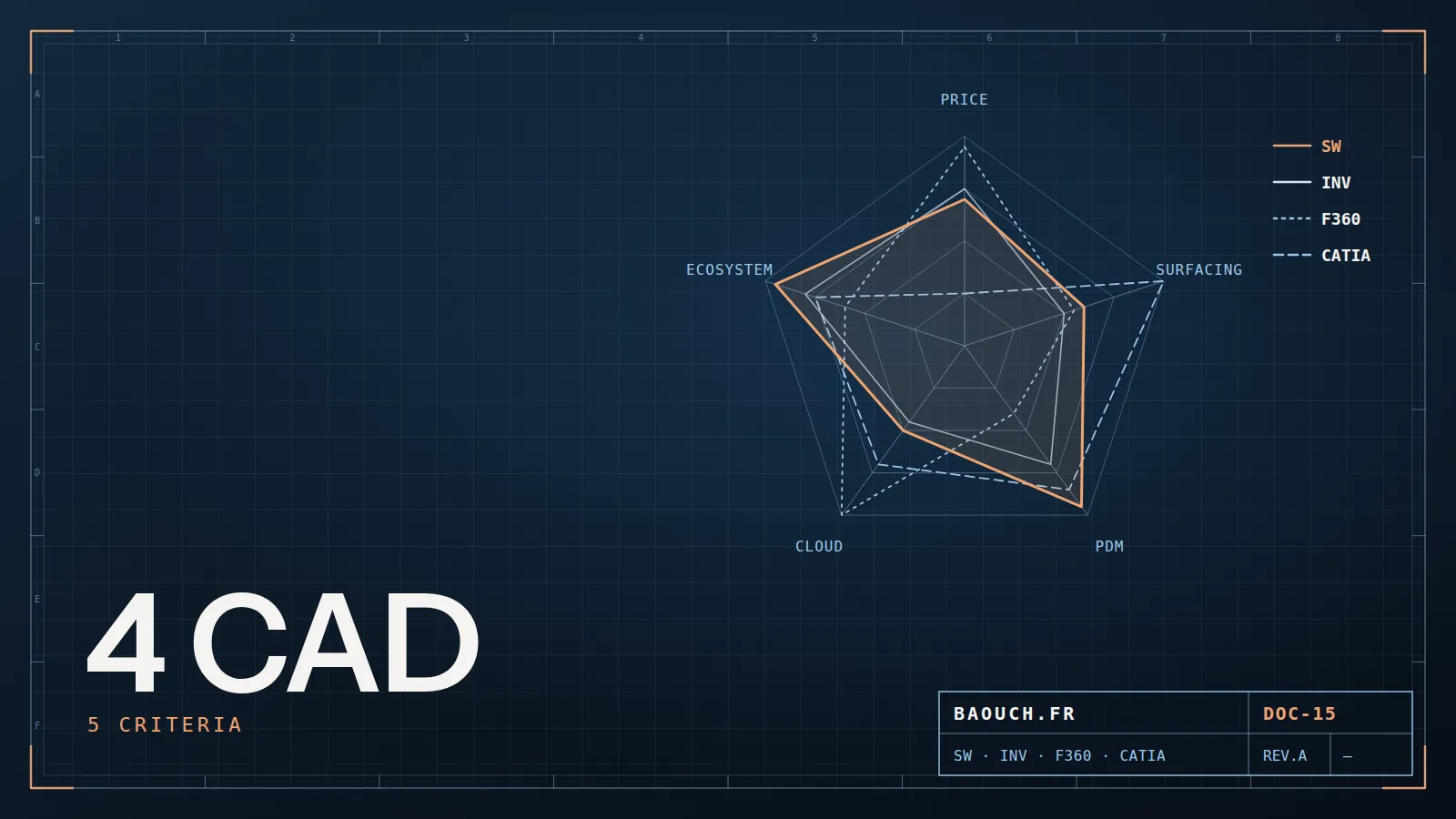
Full disclosure before we start: I work at Visiativ, a SOLIDWORKS reseller, and most of my assignments happen inside that ecosystem. You should know that as you read. That said, I've spent years recovering data produced with every other tool, and that's where this comparison comes from: from what's inside the files, not from brochures.
The short answer, by profile
If that table is enough for you, good. The rest explains why — and above all what makes one of these choices very expensive three years from now.
1. "Which one is best" is the wrong question
The major mechanical modellers on the market all do the job. On a standard mechanical part, an extrude is an extrude, a fillet is a fillet, and the comfort differences salespeople highlight fade after three weeks of use. Choosing on a feature comparison means choosing on the one criterion that will cost you nothing in five years.
The real questions lie elsewhere: who do you exchange files with? Who will you be able to hire? How will you get out of this tool the day you have to move on? Those are the expensive ones — and precisely the kind of bill that lands on my desk, several years after the contract was signed.
2. SOLIDWORKS: the de facto standard of the mechanical SME
For whom: design offices doing special machines, sheet metal, mechanical subcontracting, capital goods — the vast majority of the French industrial fabric.
What carries it: the installed base. That isn't a technical argument, it's the strongest one there is. Your customers send you native files, your subcontractors open them, candidates know the tool, component libraries exist, and the reseller network provides support and training across the country. Sheet metal and drawings are mature, and data management integrates natively — PDM Standard is in fact included with the Professional and Premium editions, so already paid for.
Its limits, honestly: complex surfacing trails CATIA or NX; very large assemblies demand method and hardware (I devoted a whole guide to that); the model stays tied to a Windows workstation, far from the flexibility of a browser tool; and the overall bill goes well beyond the license price alone.
3. Autodesk Inventor: the continuity choice
For whom: shops already living in the Autodesk world — AutoCAD everywhere, a considerable 2D drawing legacy, sometimes Revit alongside for building work.
What carries it: Inventor is a complete, serious mechanical modeller, and it usually arrives in a collection that also bundles AutoCAD, Fusion and Vault — the in-house PDM. When a company already owns those licenses and skills, paying twice to go elsewhere rarely makes economic sense.
Its limits: in France the mechanical installed base is narrower than SOLIDWORKS' — you feel it when hiring and when exchanging with customers. And beware the "the collection includes everything" reflex: Vault is a real PDM, requiring the same configuration, numbering and change-management work as any other. No tool exempts you from method.
4. Fusion 360: the best value for money, with a trade-off
For whom: hardware startups, machine shops, very small teams, product design offices where CAD and CAM live in the same hands.
What carries it: for a subscription an order of magnitude below classic licenses, you get modelling, machining, some simulation and rendering in a single tool, with immediate cloud collaboration and a fast learning curve. For a three-person team that designs and machines, it's hard to beat.
The trade-off, head on: your data lives in the vendor's cloud, with its own version-management model — which means reversibility to prepare and an export policy to set up from day one. Scaling to assemblies of several thousand components, structuring BOMs and integrating with an ERP are trickier there. Many companies start very well on Fusion, then face the switch question as they grow: anticipate it rather than endure it, as with any move to the cloud.
5. CATIA, Creo, NX, Solid Edge, Onshape: the other serious choices
- CATIA — the aerospace and automotive tool, the reference for complex surfacing and very large assemblies. In most cases it isn't chosen: it's imposed by the OEM, which wants native files. For a generalist SME it's oversized power, with an entry cost and skills requirement to match.
- Creo (PTC) and NX (Siemens) — strong on high volume, deep parametric design and simulation, with PLM integration designed at group scale (Windchill, Teamcenter). You mostly meet them where data governance is already a corporate topic.
- Solid Edge (Siemens) — a credible and often underrated alternative for SMEs, with a flexible modelling approach that shines when reworking imported geometry.
- Onshape — entirely in the browser, with versioning and branching inherited from the software world. Excellent for a distributed or multi-platform team; assess it on the permanent connection it requires and on integration with your existing chain.
- FreeCAD — open source, free, steadily improving. Perfect for learning and personal use; for a professional design office, weigh the absence of contractual support and compatibility with your customers' files.
6. The 5 criteria that actually decide
Here's the grid I use with clients, in this order of priority — the order matters as much as the list:
I have never seen a company regret its modeller for a missing feature. I've seen plenty regret it because they could no longer hire, no longer exchange with a customer, or no longer cleanly extract ten years of history.Mohamed Omar Baouch
7. The total cost nobody works out
License pricing is the visible part, and the easiest to negotiate. Over five years, also count, item by item:
- Annual maintenance, without which you lose updates and support;
- Hardware: a mechanical modeller demands properly sized workstations, and sometimes a server;
- Training and the productivity dip of the first months — the single most underestimated line;
- Legacy migration: converting, checking and re-qualifying years of files is a project in itself, not a checkbox;
- Data management, which always comes — I broke down the full cost structure of a PDM project here.
One last point, often decisive: switching modellers does not magically convert your history. Neutral formats transfer geometry, not the model's intelligence — feature tree, parameters, constraints. That's the underlying subject I covered in the CAD exchange formats guide, and the reason a tool change is planned like a migration, not like a purchase.
8. FAQ
Which CAD software is most used in France?
In mechanical engineering and special machines, SOLIDWORKS dominates the SME landscape, with Autodesk Inventor as the second established player. CATIA rules aerospace and automotive, while Creo and NX are mostly met in large groups. That distribution, more than features, should guide your choice if you work as a subcontractor.
Can Fusion 360 replace SOLIDWORKS in a company?
For a small outfit that designs and machines its own products, yes, very well. The points to check before generalising: the size of your assemblies, how BOMs are structured, integration with your ERP, and your reversibility policy for hosted data.
Can you open a SOLIDWORKS file in Inventor, and vice versa?
Yes, with varying fidelity, and usually through a neutral format. You recover the geometry, but neither the feature tree nor the parametrics. For a one-off exchange that's enough; for a wholesale takeover, it's a conversion project.
Switching CAD software: how long should you plan for?
Training is counted in weeks, the real transition in months. Most of the time doesn't go into learning the modeller, but into reworking libraries, drawing templates, numbering rules and history. Expect the same rigour as a data migration.
Should you choose the PDM at the same time as the CAD?
At the very least, choose the CAD knowing which PDM will go with it, and what's included. Nothing forces you to deploy everything in the same quarter, but discovering the subject two years later always costs more — the signals announcing that moment are fairly predictable.
The one-line summary: choose the tool of your customers and your hiring pool, check how data gets out before you go in, and budget training and legacy as seriously as licenses.Mohamed Omar Baouch