The 10 most common SOLIDWORKS errors — and how to fix them for good
Published 16 September 2026 — for each failure: the message you see, the move that unblocks you right now, and the root cause that will bring it back next week if you stop at the move. It's that second part that changes a working day.
Find your error message
1. "Missing references": the number-one failure, by far
You open an assembly and SOLIDWORKS announces it can't find components. Some show up yellow in the tree, others have vanished.
The move that unblocks: in the Open dialog, the References button lists the expected files and their paths; you can repoint the right folder before opening. To hand a complete set to someone else, always use Pack and Go: it bundles parts, drawings and references in one go.
The root cause: an assembly doesn't contain its components, it contains links to them. Moving, renaming or copying a file in Windows Explorer breaks that link silently. As long as files live in freely accessible network folders, the failure will return — it's arithmetic. The only durable fix is a vault that maintains references for you on moves and renames, which is exactly what a PDM does.
2. Read-only, locked file, "open by another user"
The move that unblocks depends on context. In a PDM vault: the file is checked out by someone, and history tells you by whom — ask for a check-in rather than working around it. On a plain network share, three suspects in order: a ghost session (the file stayed open on a sleeping workstation, or a session ended abnormally), folder rights, and the read-only attribute set on the file itself.
The dangerous reflex to ban: saving a copy "to work anyway", as part_v2.sldprt. That's the birth of the duplicate that will diverge, and the starting point of half the wrong BOMs I fix. If you can't write, resolve the lock — don't route around it.
The root cause: a network share cannot handle concurrency. It has no notion of check-out, no history, no way to say who holds what. The Windows lock is a technical stopgap, not a policy for working together.
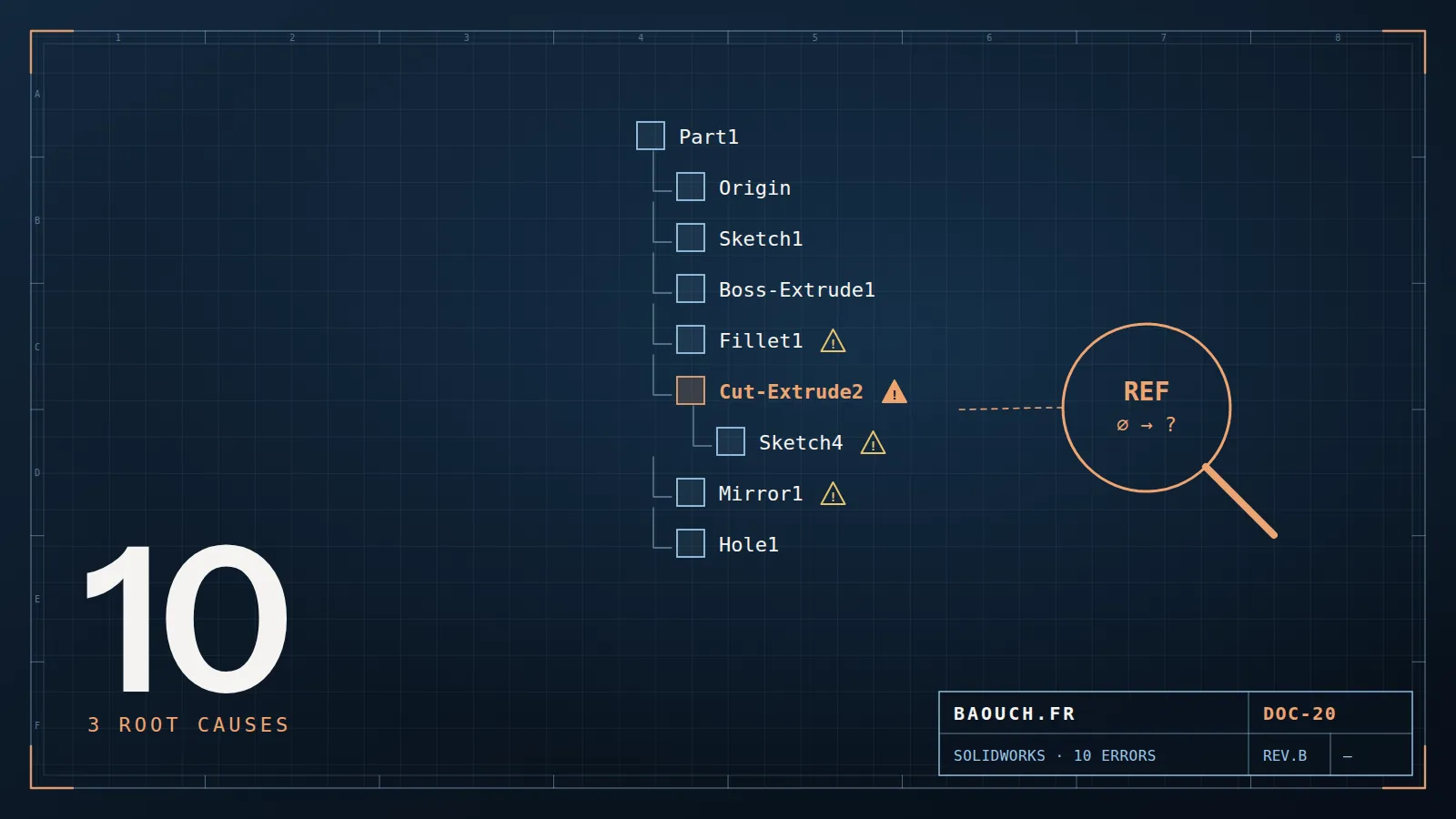
3. Cascading rebuild errors after an edit
You edit a part and the tree fills with warning flags: "missing entity", failed fillets, broken assembly mates.
The move that unblocks: first run a forced full rebuild (Ctrl+Q) — some of the displayed errors no longer exist. Then go to the first error in the tree and fix only that one: the rest are almost always its children and will vanish with it. Fixing bottom-up wastes hours.
The root cause: fragile parent-child relations. A sketch placed on a face or constrained to an edge depends on geometry that can disappear at the first upstream change. Sketch on reference planes, constrain to stable entities, and your models absorb change instead of collapsing. That's modelling method, and it can be taught.
4. Over-defined or conflicting sketches
The move that unblocks: look at relations first, not dimensions. Nine times out of ten an automatic relation — horizontal, vertical, coincident — was added while you were drawing, and it conflicts with the dimension you just placed. Delete the relation, not the dimension.
Prevention: hold Ctrl while drawing to suppress automatic relations in sensitive areas — a reflex that belongs among the shortcuts that change a working day. And get into the habit of fully defining your sketches: an under-defined sketch deforms silently at the first rebuild, which is far worse than a visible error.
5. The unmanaged Toolbox: the costliest trap
Typical symptom: the same screw doesn't carry the same part number from one workstation to another, a BOM changes content depending on who opens it, or an assembly asks for hardware components that can't be found.
The cause: every workstation holds its own local copy of the Toolbox library, each configured its own way and enriched separately over projects. Standard components then diverge machine by machine — and since they feed your BOMs, the error propagates all the way to purchasing.
The durable fix: one single library, at one shared location, declared on every workstation, writable by one responsible person and read-only for everyone else. Placed inside the PDM vault, it is versioned and protected. It's half a day of setup that avoids years of disputed BOMs.
6. The assembly that takes three minutes to open
The moves that help: open large assemblies in lightweight mode or Large Design Review when you're only consulting; remove redundant mates; avoid needless flexible sub-assemblies; and don't open heavy drawings just to read one dimension.
The root cause is rarely the model. Before blaming your design, measure where the time actually goes: workstation, network or vault. I devoted two full articles to that diagnosis, because it's the subject where design offices most often blame the wrong culprit — the 7 real causes of PDM slowness and hardware sizing.
7. "Unable to save the document"
The message that frightens, because it arrives after two hours of work. Four causes, to check in this order:
- Write rights on the target folder — the most frequent, especially after a share reorganisation.
- The file open elsewhere: another session, a viewer, or a Windows Explorer preview holding on to it.
- The antivirus scanning the file at the exact moment of writing. On a CAD workstation, working folders and the local cache deserve exclusions — a recommendation to get validated by your IT team.
- Path length: deep folder trees with endless project names eventually exceed the historic Windows limit, and the save fails with no clear explanation.
The survival reflex meanwhile: immediately save a copy to your local disk, close cleanly, then put the file back once the cause is cleared. Never quit SOLIDWORKS on that message without securing your work first.
8. The drawing that loses its views or annotations
You open a drawing: the views are empty, or the dimensions have detached and float in space.
The near-systematic cause: the referenced part or assembly was renamed or moved outside the software, or a feature carrying dimensions was deleted. An annotation is attached to a specific entity: if the entity goes, the annotation is orphaned.
The rule that eliminates the failure: renames and moves happen from SOLIDWORKS or from the vault, never from Windows Explorer. A PDM vault propagates the change across every reference, drawings included — one of its most concrete and least spectacular benefits.
9. Repeated crashes and lost work
After a crash: on restart SOLIDWORKS offers recovery of unsaved documents — never close that panel without looking at it. Also check your auto-recover and backup-copy settings: many design offices discover they had none precisely on the day they need them.
To stop it recurring: a certified graphics driver for your version — not the latest consumer driver — resolves a surprising share of unexplained crashes. Next come available memory and disk health. Here too, the subject is hardware more than software.
10. The wrong BOM — the costliest error of all
This one produces no error message at all. That's exactly what makes it expensive: it surfaces in production, or when a wrong order arrives.
The cause: properties typed by hand, part by part, with no control. A description spelled three different ways, a missing material, a revision never updated — and the BOM extracted from the model no longer matches anything.
The fix: properties enforced and validated at entry through data cards and closed lists, never left to free text. I detailed the method in SOLIDWORKS numbering and properties, and the full chain through to the ERP in BOM, eBOM, mBOM.
11. The 3 causes behind all 10 errors
Read the list again: behind ten very different symptoms, there are only three root causes.
- Files managed by hand, in folders. Broken references, duplicates, locks, wild renames, orphaned drawings: all of it goes away the day a vault handles links, versions and rights for you.
- Modelling method never formalised. Sketches placed on faces, automatic relations endured, under-defined sketches: these are habits, and habits are taught in one training session, not over ten years of trial and error.
- An undersized workstation and network. Slowness, crashes, failed saves: before blaming the software, measure. The culprit is often an uncertified driver or a saturated share.
On assignment I never start from the bug list I'm handed. I ask where the files live, who is allowed to write to them, and what happens when two people open the same part. Three quarters of the "bugs" fall away with the answer.Mohamed Omar Baouch
12. FAQ
How do I repair missing references in a SOLIDWORKS assembly?
In the Open dialog, use the References button to repoint files before opening. To hand over a complete set, use Pack and Go. If the failure keeps coming back, the problem isn't the file but the absence of reference management: that's what a PDM vault brings.
Why does my SOLIDWORKS file open read-only?
Either it's checked out by someone in the vault, or a session left it locked on another workstation, or you lack write rights on the folder, or the read-only attribute is set on the file. Never save a copy "to work anyway": that's how diverging duplicates are born.
What should I do when the whole feature tree fills with errors?
Run a forced full rebuild (Ctrl+Q), then fix only the first error in the tree: the others almost always derive from it and will clear on their own.
Why does Toolbox hardware differ between workstations?
Because each workstation uses its own local copy of the library. The fix is structural: a single shared library, writable by one owner, ideally placed inside the PDM vault.
SOLIDWORKS crashes often: is it the software or my machine?
Most often the machine, and the graphics driver leads the list. Install a driver certified for your version rather than the latest consumer one, then look at available memory and disk health.
Do these errors really go away with a PDM?
Those touching files — references, locks, duplicates, renames, orphaned drawings — yes, structurally. Those coming from modelling method or hardware, no: a PDM replaces neither training nor a properly sized workstation. All three need addressing.
The one-line summary: for two weeks, log every error you hit and the time it cost. The total will tell you, without any need for me to convince you, whether the subject deserves a project.Mohamed Omar Baouch