Industrial PLM from A to Z: what it really is, what it manages, and where to start
Published 19 September 2026 — the complete guide, written by someone who deploys these systems at manufacturers rather than selling them. Jargon-free definition, real scope, the boundary with PDM and ERP, functional building blocks, market platforms, budget and duration orders of magnitude, a starting sequence — and the mistakes that sink one project in two.
The 30-second definition
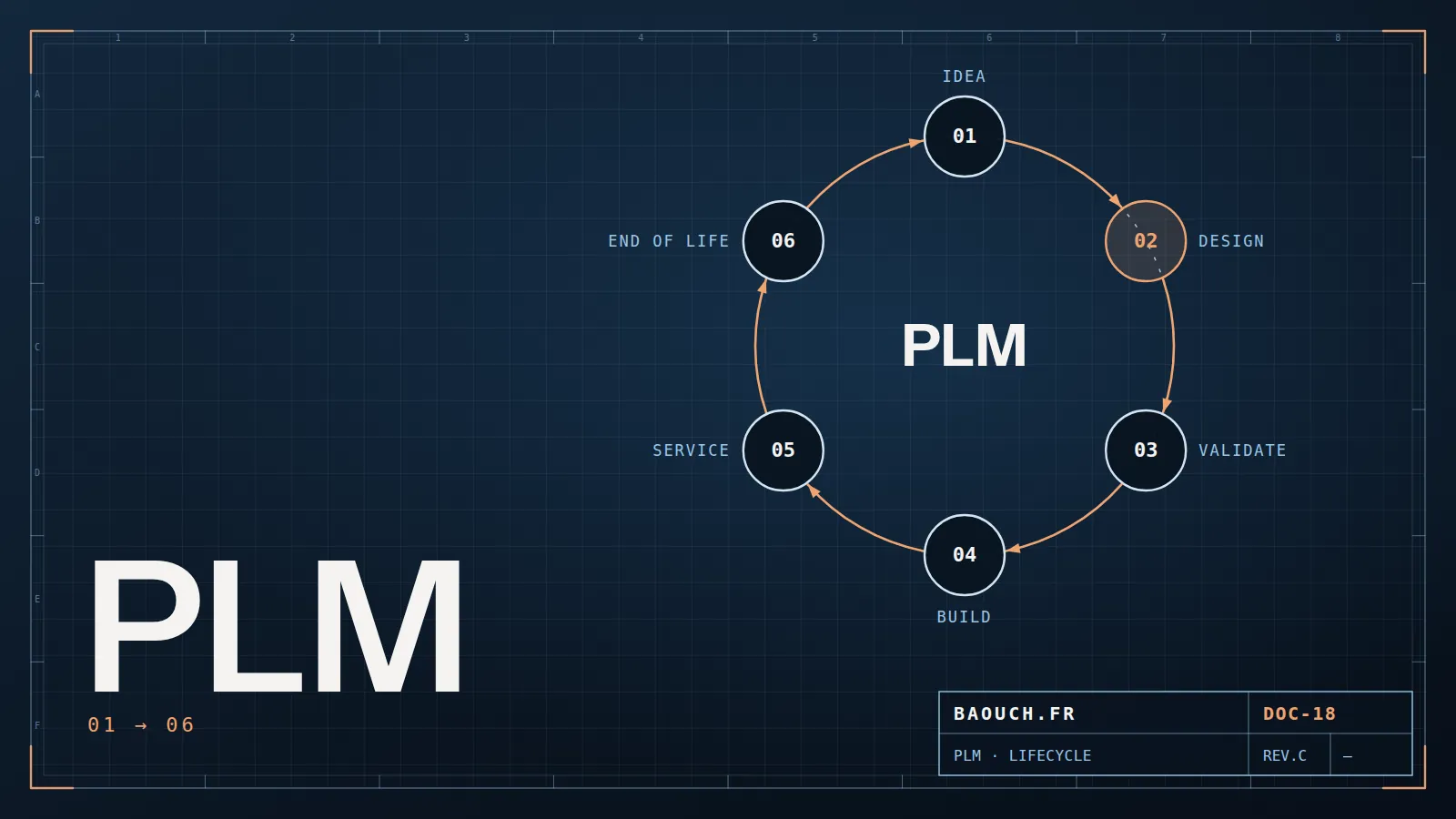
PLM — Product Lifecycle Management — is the organisation and tooling that follow a product from the first idea to its withdrawal from the market: what it must do, how it is designed, what it is made of, how it evolves, who approved what, and how you repair it ten years later.
The sentence worth remembering, because it settles most debates: PLM manages the definition of the product, ERP manages its execution. What the product is belongs to PLM; what you buy, build and invoice belongs to ERP. Between them runs the bill of materials, and that's where everything is decided.
The most widespread misunderstanding: many SMEs call "PLM" what is still only PDM — design file management. That's no sin in itself; PDM is the right starting point. But conflating the two leads either to buying an oversized system, or to being surprised that a file vault doesn't drive change management. The boundary between them, and the five signals announcing the switch, deserve an article of their own.
1. The lifecycle, stage by stage
"Lifecycle" sounds theoretical until you tie it to real people and real documents. Here are the six stages, with what each produces — and the role that carries it in an industrial SME:
A point the brochures leave out: almost no SME covers all six stages, and that is not a failure. Most draw the bulk of their value from stages 2 to 4. Covering the full lifecycle is a large-group objective, not a prerequisite to start.
2. PDM, PLM, ERP, MES: the map of the technical information system
Four acronyms, permanent confusion, and entire projects launched on a misunderstanding. The useful distinction isn't functional but temporal: each one acts at a different moment in the life of the information.
The question that matters isn't "which one to choose" — most manufacturers have all four, to varying degrees — but where the boundary runs, and who holds the truth about what. The friction point is always the same: the bill of materials. Who creates it, who edits it, which way it flows between PLM and ERP. I devoted a full article to that chain, because it decides everything else: BOM, eBOM, mBOM: the backbone of your product data.
3. The 7 functional building blocks of a PLM
Behind the word, here's what you actually buy. Few companies deploy all seven at once — and that's perfectly fine.
- 1. The item master. The single list of everything that exists — parts, assemblies, purchased items, consumables — with a controlled identifier. It's the foundation: without sound part numbering, none of the other six blocks holds.
- 2. Document management. Drawings, manuals, test reports, material certificates: versioned, approved, linked to the relevant items. This is the block a PDM already partly covers.
- 3. Bills of materials. The product structure, and above all the transformation from engineering BOM to manufacturing BOM — the exact place where engineering and methods stop speaking the same language.
- 4. Change management. Request, assessment, impact, approval, release: the ECR/ECO loop. It's the block that most clearly separates a PLM from a PDM, and the one that prevents phantom revisions reaching production.
- 5. Workflows and states. In work, under review, approved, obsolete — with who may move what to the next state. It's the formalisation of your approval rules, and often the first time they've been written down.
- 6. Configuration and variants. Managing a range without duplicating the same product a hundred times for three options. Critical as soon as you build special machines or catalogued custom products.
- 7. Compliance and quality. Audit traceability, regulatory requirements, certificates, manufacturing records. Often the block that justifies the budget to management, because it's measured in risk avoided.
If you could deploy only two, take the item master and change management. The first gives you a shared language, the second stops that language from decaying. Everything else can wait for next year's budget.Mohamed Omar Baouch

4. Market platforms, and who they suit
A disclosure before the list: I work at Visiativ, a reseller in the Dassault Systèmes ecosystem. You should know that as you read on. The overview below is nonetheless the one I give clients, because a misdirected project serves nobody.
- 3DEXPERIENCE (Dassault Systèmes) — the natural continuation for a shop already on SOLIDWORKS or CATIA: design, data and collaboration live on one platform, cloud or on-premise. Watch out: it's a paradigm change more than an upgrade, and moving to the cloud deserves serious preparation.
- PTC Windchill — well established in series manufacturing and among tier suppliers, robust on change management and complex configurations. Demanding in configuration and governance: a tool for an established organisation.
- Siemens Teamcenter — the large-group reference, notably automotive and aerospace, with very broad functional coverage and deep Siemens integration. Rarely the right pick for a standalone SME.
- Aras Innovator — an open, highly customisable approach, valued when processes stray from the beaten path. In exchange, customisation demands in-house skills or a lasting partner.
- Autodesk (Vault, Fusion Manage) — continuity for shops already on Inventor and AutoCAD, with the same ecosystem logic as on the Dassault side.
- PLM modules inside ERPs (Odoo, SAP, Oracle and others) — tempting because they're "already there". They genuinely help on items and changes, but show their limits quickly on CAD, configurations and document volume. Worth an honest evaluation rather than dismissal on principle.
The criterion that most often decides isn't the feature list: it's the CAD tool already in place and the organisation's capacity to absorb the configuration effort. The same logic governs choosing a CAD package.
5. Budget and duration: orders of magnitude
No vendor publishes prices, and for good reason: cost depends on scope, user count and above all on migrating what exists. Here's what I observe in the field — treat it as framing, not as a quote.
- The most consistent split: licenses often account for less than half the total budget. Configuration, data migration and training make up the rest — and those are what overrun.
- Data migration is systematically underestimated. Cleaning, de-duplicating and re-qualifying years of files is a project in its own right, which I detailed in the migration guide.
- On duration: a PDM scope over one design office deploys in a few months; a PLM touching methods, purchasing and quality is counted in quarters, and must be split into phases. Anyone promising a complete PLM in six weeks is selling you a tool, not a project.
- The cost of doing nothing can be quantified too, and it's often the decisive argument: time lost hunting files, parts made to the wrong revision, re-keying between systems, audits prepared in panic. Count them over one quarter before discussing licenses — see the detailed cost breakdown of a PDM project.
6. Where to start: the 6-step sequence
It's the question I'm asked most, and the answer surprises: you don't start by choosing software. Here's the order that works.
- Map what exists. Where the files live, who holds which truth, how a change travels today. Two days of interviews beat three vendor demos.
- Clean up the item master. Numbering, mandatory properties, duplicates removed. Thankless, invisible, and absolutely decisive: a PLM fed with dirty data produces dirty results, faster.
- Write the rules before the tool. Who approves what, when a revision changes, what triggers a modification. Those rules already exist in your company, orally: writing them down surfaces the disagreements no software will settle.
- Choose the tool, rules in hand. Only at this point do demos become useful: you test a product against your processes, instead of adopting the vendor's by default.
- Deploy in phases, on a pilot scope. One product family, one team, three months. You fix on a small scope what would have cost dearly to fix company-wide.
- Treat adoption as a deliverable. Training, internal champions, follow-up on reported irritants. A system nobody uses has cost twice: the license, and the workaround that replaced it.
7. The 6 mistakes that sink a PLM project
- Trying to cover everything at once. Full scope across the whole company in year one: the number-one cause of failure, far ahead of technical problems.
- Replicating broken processes as-is. Digitising an approval loop that doesn't work produces a faster broken loop — now enforceable, too.
- Neglecting data migration. The most underestimated line item of all, and the one that slips schedules by months.
- Leaving the project to IT alone. PLM is a business topic owned by engineering and methods; IT operates it, but doesn't own it.
- Choosing the tool before writing the rules. You then inherit the vendor's default processes, which are not yours — and you discover them in production.
- Forgetting that people must gain something. If the new system adds five clicks without simplifying anything for the person clicking, it will be bypassed. Adoption isn't decreed, it's designed.
I recounted five of these situations as I lived them, with what worked and what didn't, in this field account.
8. Going further, topic by topic
Every block mentioned here has its detailed article. Here is the full path, in the order it usefully reads:
Understand and decide
- PDM or PLM: the 5 signals that you've outgrown your vault
- SOLIDWORKS PDM: Standard or Professional, the complete guide
- What does a SOLIDWORKS PDM project really cost?
- Moving your PDM to the cloud: what you're never told before signing
Structure the product data
- BOM, eBOM, mBOM: the backbone of your product data
- Numbering & properties: repairing the chain through to the ERP
- The €40,000 phantom revision: mastering ECO/ECR
- STEP, IGES, Parasolid: which exchange format, and what gets lost
Deploy and operate
- Data migration to SOLIDWORKS PDM: the field guide
- Slow SOLIDWORKS PDM: the 7 real causes
- The 10 most common SOLIDWORKS errors
- Hardware setup: sizing workstations, server and network
Real cases
9. FAQ
What's the difference between PDM and PLM?
PDM manages design files — versions, rights, references — for the design office. PLM manages the product definition across its whole lifecycle: items, BOMs, changes, requirements, compliance, and it involves methods, purchasing, production and quality as much as engineering. PDM is often the first block of a PLM.
Does PLM replace the ERP?
No, they're complementary: PLM defines the product, ERP executes it. The question isn't which to choose, but where the boundary sits and which way the BOM flows between them.
Does a 20-person SME need a PLM?
Rarely a full PLM, often a well-configured PDM plus formalised change management. The right question isn't company size but product complexity and how many people must agree on one definition.
How long does a PLM project take?
A PDM scope over one design office is counted in months; a PLM spanning several departments is counted in quarters and split into phases. Duration depends far more on the state of your existing data than on the chosen software.
What's the concrete first step?
Mapping what exists and cleaning up the item master — before any vendor demo. Tools only compare usefully once your rules are written down.
Do you need a PLM to be ISO 9001 certified?
No, the standard mandates no tool. But it requires document control and change traceability that a well-configured system makes nearly automatic, where a shared-folder organisation makes them expensive to demonstrate during an audit.
The one-line summary: PLM isn't software to buy, it's an agreement to reach on what the product is — the tool merely holds it. Start with the item master and change management, and let the rest follow.Mohamed Omar Baouch