What does a SOLIDWORKS PDM project really cost?
Published July 10, 2026 — the complete cost structure of a PDM deployment: licenses, SQL Server, infrastructure, services, data migration and hidden costs. With field-observed orders of magnitude and the 5 traps that blow up budgets.
Type "SOLIDWORKS PDM price" into a search engine: you'll find marketing pages that all end with "contact us". Frustrating when you're simply trying to build a forecast budget. After 100+ PDM projects, here's what I can honestly publish: the complete cost structure, the observed orders of magnitude, and above all the ratios between items — because that's where budgets go wrong.
Honest disclaimer: exact license prices depend on your reseller, country, seat count and negotiated discounts — they change every year. This article gives indicative France-2026 ranges and a costing method. For a firm quote, you need a conversation about your context (it's at the bottom of the page, and it's free).
1. The 4 items of a PDM budget — and their real ratios
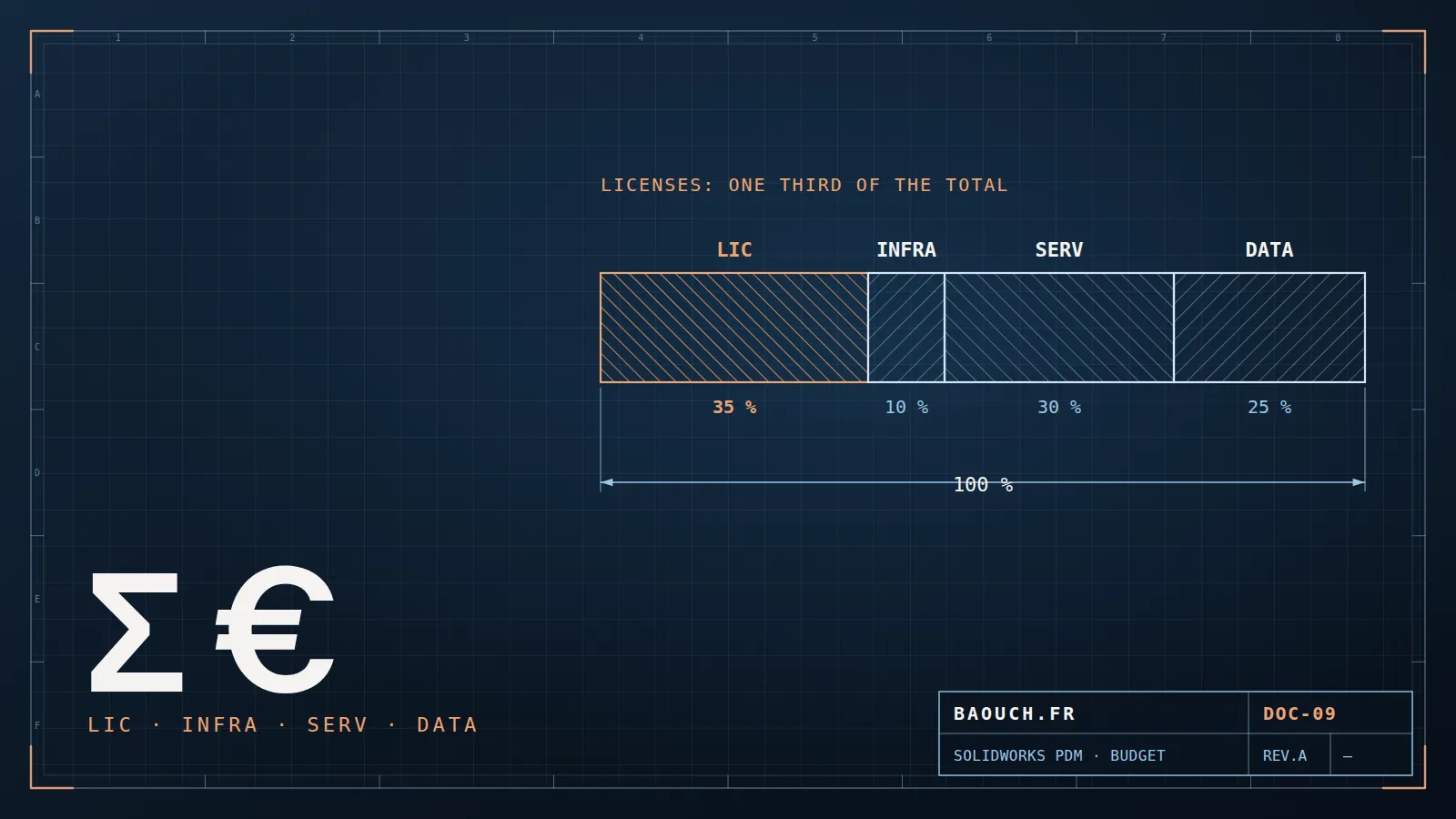
A complete PDM budget always breaks down into four items: licenses, infrastructure, services (configuration, training, support) and data migration. The classic mistake is budgeting the licenses… and discovering the rest along the way. On a well-run project, here are the ratios I observe:
If a PDM quote contains only licenses and three days of installation, it's not a cheaper project: it's an incomplete one. Configuration, training and migration of existing data will come anyway — as change orders, at the worst moment.Mohamed Omar Baouch
2. Item 1 — Licenses: Standard, Professional, maintenance
- PDM Standard: included with SOLIDWORKS Professional and Premium. If your needs fit its limits (single site, one workflow, no API), your PDM license cost is already paid — the best value on the market.
- PDM Professional: separate per-user license, in two types — CAD Editor (designers) and Contributor/Viewer (review, approval, purchasing… much cheaper). Observed order of magnitude: a few thousand euros per CAD Editor seat to purchase, with Contributor and Viewer licenses costing a fraction of that. The Editor/Contributor mix is the first optimization lever: in many teams, 30-50% of users don't need a full license.
- Annual maintenance (subscription): typically 18-25% of the license price per year. It covers updates and support. Include it in the recurring budget from year 1 — it's what makes up the real 5-year cost of ownership.
- SQL Server: PDM Standard runs on SQL Express (free, 10 GB cap). PDM Professional requires SQL Server Standard — whose license, often forgotten, runs into thousands of euros depending on licensing mode (cores or server + CALs).
3. Item 2 — Infrastructure: servers, backup, network
A serious PDM deployment needs a server (physical or VM) for the SQL database and the archive server — ideally separated beyond ~20 active users. Order of magnitude: a few thousand euros for a properly sized VM (fast CPU, generous RAM for SQL, SSD storage), plus backup — non-negotiable: SQL database and archives, restore-tested. For multi-site, add one replicated archive server per remote site (see a multi-site migration across countries).
Good news: if your infrastructure is already virtualized and backed up, the marginal extra cost is small. Bad news: an under-sized server is the #1 cause of "slow PDM" — and the diagnosis + remediation will cost more than the RAM you saved (I wrote a whole article on the 7 causes of slowness). If you're torn between this server and a cloud subscription, compare them item by item over five years with the on-premise / cloud cost grid.
4. Items 3 & 4 — Services and data migration: where it's all decided
Services cover: specification workshops (states, workflows, data cards, revision scheme), vault configuration, integrations (ERP where relevant), administrator then user training, and go-live support. On a first SME project, expect from a few days (simple Standard) to several weeks (Professional with ERP) of services. It's the item companies underestimate most — yet it's what turns software into an adopted working tool.
Data migration deserves its own budget: auditing what exists, cleaning duplicates, normalizing properties, migrating in waves, verifying. Field rule: its cost depends on the initial disorder, not the volume. 50,000 clean files migrate faster than 15,000 chaotic ones. It's the most critical phase of the project — where "never trust existing data" isn't a slogan but a method (full guide here).
5. Three typical costed scenarios
To give concrete reference points — indicative all-in first-year ranges, excluding the SOLIDWORKS CAD licenses themselves:
What about ROI? The simplest calculation speaks loudest: one hour per week per designer lost searching for files or redoing existing work, across 15 designers, equals half a full-time position per year. Add a single avoided incident like "wrong revision sent to production" (frequently €10,000-50,000 — documented example here) and most projects pay back within 12-24 months.
6. The 5 traps that blow up the budget
- Budgeting licenses, forgetting the rest. The real ratio is ~1/3 licenses, ~2/3 everything else. A "licenses only" quote is not a project budget.
- Over-licensing. Giving everyone a CAD Editor "to keep it simple" when half the team only reviews and approves. The right Editor/Contributor/Viewer mix typically saves 20-35% of the license item.
- Discovering the data's condition mid-migration. The upfront audit costs a few days; the same work discovered mid-project costs weeks and a blown schedule. It's trap #1 by frequency.
- Skipping training and change management. A PDM users work around (local files, vault "for later") returns nothing — you're paying maintenance on an unused tool. Adoption is built, not decreed.
- Doing everything in phase 1. ERP + multi-site + quality workflows + full migration in a single big bang: the classic profile of the never-ending project. Slice it: vault + design workflow first, integrations next. Each phase delivers value and funds the next.
A well-scoped PDM project isn't an IT expense: it's the insurance of your design assets — the only digital copy of your product know-how. Cost it fully, phase it smartly, and it becomes one of the most profitable investments an engineering office can make.
Frequently asked questions
What does a SOLIDWORKS PDM project cost?
The cost breaks down into licenses, infrastructure (server, SQL Server), configuration services, data migration and training. Licenses rarely account for half the total: services and data migration are what move the bill, and they depend on the state of what you already have.
Is PDM Standard free?
It's included with SOLIDWORKS Professional and Premium — so already paid for if you own those editions. But included doesn't mean deployed: configuration, data migration and training still need funding.
What are the hidden costs of a PDM project?
The usual three: data migration, systematically underestimated; the productivity dip of the first weeks; and ongoing administration once in production. Add hardware renewal if the workstations can't keep up.
How do you justify the budget to management?
By quantifying the cost of inaction over one quarter: hours spent hunting files, parts made to the wrong revision, re-keying between systems, audits prepared in panic. That calculation usually speaks louder than any feature list.